---
title: Why does my submission PDF look different to my work in Cadmus?
description: Pasted text can introduce invisible characters that warp your PDF formatting. Here’s how to use the Hidden Characters tool in Cadmus to fix them.
---
[Skip to content](https://support.cadmus.io/why-does-my-submission-pdf-look-different-to-my-work-in-cadmus#main-content)
English
Show submenu for translations
[Contact Support](https://support.cadmus.io/kb-tickets/new?hsLang=en)
[![Cadmus Wordmark & Logo\_Master File\_Cadmus Icon\_Ink.png\]](https://support.cadmus.io/hs-fs/hubfs/Cadmus%20Wordmark%20%26%20Logo_Master%20File_Cadmus%20Icon_Ink.png?height=40&name=Cadmus%20Wordmark%20%26%20Logo_Master%20File_Cadmus%20Icon_Ink.png)](https://support.cadmus.io/?hsLang=en)
- [Cadmus](https://cadmus.io/)
- [Contact Support](https://support.cadmus.io/kb-tickets/new)
Open main navigation
Close main navigation
- [Cadmus](https://cadmus.io/)
- [Contact Support](https://support.cadmus.io/kb-tickets/new)
- English
Show submenu for translations
- [Contact Support](https://support.cadmus.io/kb-tickets/new)
What would you like to learn?
- There are no suggestions because the search field is empty.
1. [Cadmus Help Docs](https://support.cadmus.io/?hsLang=en)
2. [Students](https://support.cadmus.io/students?hsLang=en)
3. [FAQs + Troubleshooting](https://support.cadmus.io/students?hsLang=en#faqs-troubleshooting)
# Why does my submission PDF look different to my work in Cadmus?
## Find and remove hidden characters that can cause your submission PDF to wrap or format differently than what you see in the editor.
When you *paste* text into Cadmus from another source, it can sometimes bring along invisible characters, such as **non-breaking spaces, zero-width spaces, or soft hyphens**. These look like a normal space in the editor, so there’s nothing to suggest anything’s wrong. However, they can affect how your text wraps once it’s exported to PDF, resulting in formatting differences between the Cadmus editor and your submission document.
To find and remove them before submitting your final work, you can turn on Hidden Characters from the Toolbar.
1. Click the button **¶** make hidden characters visible. This reveals a legend banner below the toolbar and overlays a small, colour-coded symbol on each hidden character in your document.
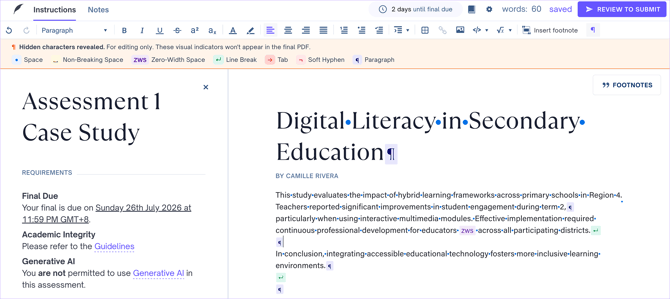
2. Review your document for any unexpected hidden characters. Click next to it and backspace or delete the character, replacing it with a regular character if needed.
The toggle is off by default and resets each time you open the editor so you will need to turn it on again. When the toggle is on, these symbols are a visual overlay only, and won’t affect your actual content.
### Using *Find and Replace* feature
If there are multiple hidden characters in the assessment, you can bulk edit them using the *Find and Replace* feature by following the steps below:
1. Open the *Find and Replace* feature. In Mac, students can use Cmd+F. In Windows, students can use either Ctrl+F or Ctrl+H.
2. Click on the **Hidden Characters** button, then select which hidden characters you'd like to replace. Any matching characters will be highlighted.
3. Type a normal space in the *Replace with* box
4. Click **Replace all**
We also have a quick demo below.

TIP: It’s worth checking for hidden characters before submitting, especially if you’ve pasted content from another document or a website. Catching these early can help you avoid formatting differences in your submitted PDF.
- [Teachers](https://support.cadmus.io/teachers?hsLang=en#main-content)
- [Introduction](https://support.cadmus.io/teachers?hsLang=en#introduction)
- [Setting up assessments](https://support.cadmus.io/teachers?hsLang=en#setting-up-assessments)
- [Managing your class](https://support.cadmus.io/teachers?hsLang=en#managing-your-class)
- [Turnitin + Cadmus](https://support.cadmus.io/teachers?hsLang=en#turnitin-cadmus)
- [Marking + feedback](https://support.cadmus.io/teachers?hsLang=en#marking-feedback)
- [Exams](https://support.cadmus.io/teachers?hsLang=en#exams)
- [Drafts](https://support.cadmus.io/teachers?hsLang=en#drafts)
- [Insights](https://support.cadmus.io/teachers?hsLang=en#insights)
- [Students working](https://support.cadmus.io/teachers?hsLang=en#students-working)
- [FAQs + Troubleshooting](https://support.cadmus.io/teachers?hsLang=en#faqs-troubleshooting)
- [Multi-format Assessments](https://support.cadmus.io/teachers?hsLang=en#multi-format-assessments)
- [Group Assessments](https://support.cadmus.io/teachers?hsLang=en#group-assessments)
- [Oral Assessments](https://support.cadmus.io/teachers?hsLang=en#oral-assessments)
- [Students](https://support.cadmus.io/students?hsLang=en#main-content)
- [Introduction](https://support.cadmus.io/students?hsLang=en#introduction)
- [Working in Cadmus](https://support.cadmus.io/students?hsLang=en#working-in-cadmus)
- [Submitting](https://support.cadmus.io/students?hsLang=en#submitting)
- [Grades + Feedback](https://support.cadmus.io/students?hsLang=en#grades-feedback)
- [Drafts](https://support.cadmus.io/students?hsLang=en#drafts)
- [FAQs + Troubleshooting](https://support.cadmus.io/students?hsLang=en#faqs-troubleshooting)
- [Multi-format Assessment](https://support.cadmus.io/students?hsLang=en#multi-format-assessment)
- [Group Assessments](https://support.cadmus.io/students?hsLang=en#group-assessments)
- [Oral Assessments](https://support.cadmus.io/students?hsLang=en#oral-assessments)
- [Admins](https://support.cadmus.io/admins?hsLang=en#main-content)
- [Integrations](https://support.cadmus.io/admins?hsLang=en#integrations)
- [Release Notes](https://support.cadmus.io/release-notes?hsLang=en)
- [Privacy Policy](https://support.cadmus.io/privacy-policy?hsLang=en)
- [Cadmus](https://cadmus.io/)
- [Video Tutorials](https://cadmus.io/video-tutorials/)
- [Contact Support](https://support.cadmus.io/kb-tickets/new)
- [System Status](https://cadmus.statuspage.io/)
[](http://cadmus.io)
Copyright © 2026, Cadmus