---
title: Setting Up Peer Evaluation as a Group Score Multiplier
description: Learn how to set up Peer Evaluation as a Group Score Multiplier in Cadmus, how each student's multiplier is calculated, and where to review it.
---
[Skip to content](https://support.cadmus.io/setting-up-peer-evaluation-as-a-group-score-multiplier#main-content)
English
Show submenu for translations
[Contact Support](https://support.cadmus.io/kb-tickets/new?hsLang=en)
[![Cadmus Wordmark & Logo\_Master File\_Cadmus Icon\_Ink.png\]](https://support.cadmus.io/hs-fs/hubfs/Cadmus%20Wordmark%20%26%20Logo_Master%20File_Cadmus%20Icon_Ink.png?height=40&name=Cadmus%20Wordmark%20%26%20Logo_Master%20File_Cadmus%20Icon_Ink.png)](https://support.cadmus.io/?hsLang=en)
- [Cadmus](https://cadmus.io/)
- [Contact Support](https://support.cadmus.io/kb-tickets/new)
Open main navigation
Close main navigation
- [Cadmus](https://cadmus.io/)
- [Contact Support](https://support.cadmus.io/kb-tickets/new)
- English
Show submenu for translations
- [Contact Support](https://support.cadmus.io/kb-tickets/new)
What would you like to learn?
- There are no suggestions because the search field is empty.
1. [Cadmus Help Docs](https://support.cadmus.io/?hsLang=en)
2. [Teachers](https://support.cadmus.io/teachers?hsLang=en)
3. [Group Assessments](https://support.cadmus.io/teachers?hsLang=en#group-assessments)
# Setting Up Peer Evaluation as a Group Score Multiplier
## A guide to setting up Peer Evaluation as a Group Score Multiplier, how it's calculated, and where to find each student's result.
With Peer Evaluation as a Group Score Multiplier mode (referred to moving forward as simply ***Multiplier mode***), teachers can set peer evaluation to act as a scaling factor on the group score rather than a standalone grade component.
Students who are rated at or above the group average keep their full share of the group score, while those rated below have their share proportionally reduced.
This option allows teachers to better recognise individual student contribution within a group assessment by adjusting each student's share of the group score based on how their peers rated their contribution.
In this guide, we’ll cover:
- [Enabling Peer Evaluation as a Group Score Multiplier](https://support.cadmus.io/setting-up-peer-evaluation-as-a-group-score-multiplier#enabling)
- [How the Multiplier is Calculated](https://support.cadmus.io/setting-up-peer-evaluation-as-a-group-score-multiplier#calculation)
- [Reviewing the Multiplier](https://support.cadmus.io/setting-up-peer-evaluation-as-a-group-score-multiplier#review)
- [What Students See](https://support.cadmus.io/setting-up-peer-evaluation-as-a-group-score-multiplier#student)
### Enabling Peer Evaluation as a Group Score Multiplier
The multiplier mode is best enabled during the assessment's initial setup by following the steps below:
1. Open the **Group Assessment Requirements** page for the assessment.
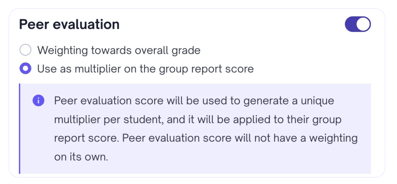
2. Toggle on the **Peer Evaluation** component
3. Select **Use as multiplier on the group report score.** The weighting inputs will disappear, as a scalar is used instead.
****
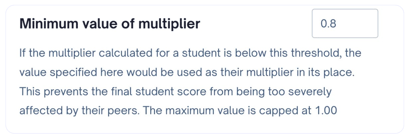
4. In the **Minimum value of multiplier field that appears,** enter the lowest multiplier a student can receive. The valid range is 0.52–1.00. The field defaults to **1.00**. At this value, no scaling occurs, and every student keeps their full share, so a lower value must be set for the multiplier to take effect.
5. Click **Update Settings** to save.
**Note:** The *Minimum value of multiplier* acts as a floor, to ensure a single poor peer evaluation doesn't have an outsized impact on a student's grade. If a student's calculated multiplier falls below it, the floor value is applied instead. For example, if the minimum is set to 0.60 but the student's calculated multiplier is 0.40, their multiplier will still be 0.60.
### How the Multiplier is Calculated
Each student's multiplier is derived from how their peer evaluation score compares to the group's peer evaluation score average.
Students at or above the group average receive a multiplier of 1.00 and keep their full share of the group score. Students below the average receive a reduced multiplier, with the minimum value acting as a floor.
A few things to note about how the multiplier is calculated:
- **Group Average:** Only students who completed all their peer evaluations are included in the group average. This prevents non-completions from pulling the average down for everyone else.
- **Non Completers:** Students who didn't complete their peer evaluations receive the [minimum value of multiplier directly](https://support.cadmus.io/setting-up-peer-evaluation-as-a-group-score-multiplier#minimumvalueofmultiplier), without going through the formula, as a penalty for not participating.
- **Solo Group:** Students in a solo group (one active member) always receive a multiplier of 1.00, since there are no peers to rate them.
- **Self Evaluation**: If Self Evaluation is enabled, a student's self-evaluation score is included in the calculation as if it were another peer evaluation score; it feeds into the same formula rather than adding a separate component.
#### **The Formula**
**Multiplier = √(student peer eval score ÷ group average peer eval score)**
The result is rounded to 2 decimal places and clamped to the range between the [**Minimum Value of Multiplier**](https://support.cadmus.io/setting-up-peer-evaluation-as-a-group-score-multiplier#minimumvalueofmultiplier) and **1.00**. The square root in the formula ensures the adjustment stays proportionate; a student rated below the group average is penalised, but not so severely that a single peer evaluation round has an outsized effect on their grade.
A detailed breakdown of how the multiplier is calculated can be found below.
#### **Worked Example**
- Minimum multiplier: **0.80.**
- Group size: **4 students**
- Group report score: **80**
- Group average peer evaluation score: **(100 + 80 + 60 + 40) ÷ 4 = 70**
**Multiplier Calculation**
| Student | Peer Eval Score | Raw Multiplier | Final Multiplier |
| --- | --- | --- | --- |
| **A** | 100 | √(100/70) = 1.20 | 1.00 (can’t be above 1.00) |
| **B** | 80 | √(80/70) = 1.07 | 1.00 (can’t be above 1.00) |
| **C** | 60 | √(60/70) = 0.93 | 0.93 (within range, unchanged) |
| **D** | 40 | √(40/70) = 0.76 | 0.80 (can’t be below the minimum) |
**Final Score Calculation using the Final Multiplier**
| Student | Group Report Score | Final Multiplier | Final Score |
| --- | --- | --- | --- |
| **A** | 80 | 1.00 | 80 |
| **B** | 80 | 1.00 | 80 |
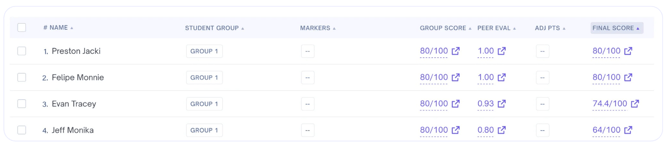
| **C** | 80 | 0.93 | 74.4 |
| **D** | 80 | 0.80 | 64 |
The *Moderation* tab will display the scores as below.
### Reviewing the Multiplier
#### **Moderation Tab**
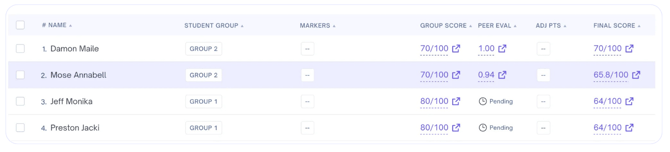
The Moderation tab shows each student's multiplier to two decimal places. If a student's group hasn't completed their peer evaluations yet, the multiplier column displays *Pending* until the peer evaluation is complete.
#### **Marking Page**
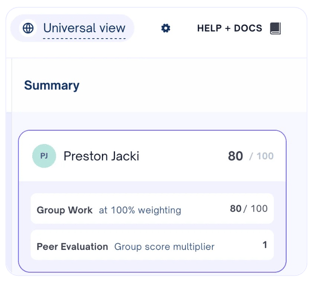
In the right-hand **Summary** panel on the marking page, each group member's score breakdown can be expanded. In Multiplier mode:
- The **Peer Evaluation** row displays **Group score multiplier** as its subtitle, with the multiplier shown as a plain number (e.g. **1,** **0.93**).
- If peer evaluations are still in progress, the row shows *Pending* until peer evaluation is complete.
- If enabled, the **Self Evaluation** score is hidden, since self-evaluation scores feed into the multiplier rather than being processed as separate component.
### What Students See
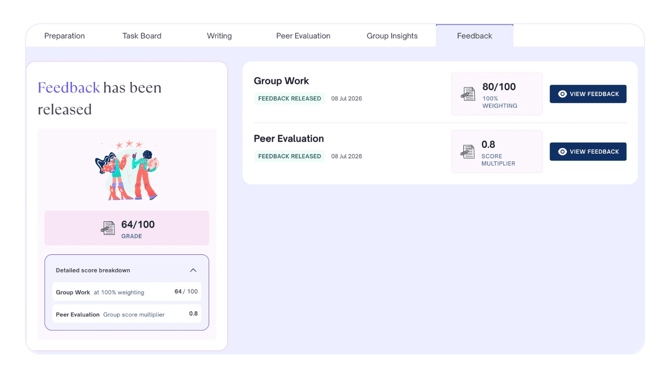
The process of submitting a peer evaluation stays the same for students regardless of which option is chosen. Once feedback is released, however, students can view their multiplier in the feedback viewer.
The **Peer Evaluation** feedback card displays the multiplier prominently above the label **Score Multiplier**, in place of the usual score and weighting.
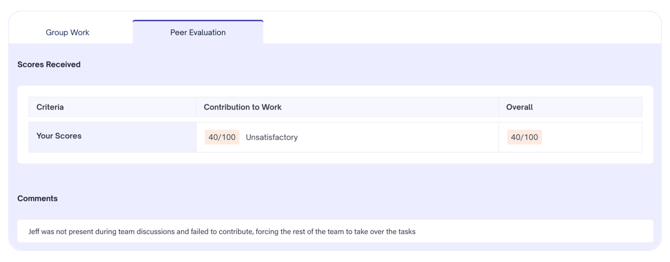
Clicking **View Feedback** opens the detailed peer feedback page, showing the rubric breakdown and any peer comments received.
**Note:** If **Self Evaluation** is enabled, the student's self-evaluation score will not be displayed in the feedback viewer, as it is processed as part of the peer evaluation and feeds directly into the multiplier calculation. This is consistent with how the score is displayed in the marking summary view.
- [Teachers](https://support.cadmus.io/teachers?hsLang=en#main-content)
- [Introduction](https://support.cadmus.io/teachers?hsLang=en#introduction)
- [Setting up assessments](https://support.cadmus.io/teachers?hsLang=en#setting-up-assessments)
- [Managing your class](https://support.cadmus.io/teachers?hsLang=en#managing-your-class)
- [Turnitin + Cadmus](https://support.cadmus.io/teachers?hsLang=en#turnitin-cadmus)
- [Marking + feedback](https://support.cadmus.io/teachers?hsLang=en#marking-feedback)
- [Exams](https://support.cadmus.io/teachers?hsLang=en#exams)
- [Drafts](https://support.cadmus.io/teachers?hsLang=en#drafts)
- [Insights](https://support.cadmus.io/teachers?hsLang=en#insights)
- [Students working](https://support.cadmus.io/teachers?hsLang=en#students-working)
- [FAQs + Troubleshooting](https://support.cadmus.io/teachers?hsLang=en#faqs-troubleshooting)
- [Multi-format Assessments](https://support.cadmus.io/teachers?hsLang=en#multi-format-assessments)
- [Group Assessments](https://support.cadmus.io/teachers?hsLang=en#group-assessments)
- [Oral Assessments](https://support.cadmus.io/teachers?hsLang=en#oral-assessments)
- [Students](https://support.cadmus.io/students?hsLang=en#main-content)
- [Introduction](https://support.cadmus.io/students?hsLang=en#introduction)
- [Working in Cadmus](https://support.cadmus.io/students?hsLang=en#working-in-cadmus)
- [Submitting](https://support.cadmus.io/students?hsLang=en#submitting)
- [Grades + Feedback](https://support.cadmus.io/students?hsLang=en#grades-feedback)
- [Drafts](https://support.cadmus.io/students?hsLang=en#drafts)
- [FAQs + Troubleshooting](https://support.cadmus.io/students?hsLang=en#faqs-troubleshooting)
- [Multi-format Assessment](https://support.cadmus.io/students?hsLang=en#multi-format-assessment)
- [Group Assessments](https://support.cadmus.io/students?hsLang=en#group-assessments)
- [Oral Assessments](https://support.cadmus.io/students?hsLang=en#oral-assessments)
- [Admins](https://support.cadmus.io/admins?hsLang=en#main-content)
- [Integrations](https://support.cadmus.io/admins?hsLang=en#integrations)
- [Release Notes](https://support.cadmus.io/release-notes?hsLang=en)
- [Privacy Policy](https://support.cadmus.io/privacy-policy?hsLang=en)
- [Cadmus](https://cadmus.io/)
- [Video Tutorials](https://cadmus.io/video-tutorials/)
- [Contact Support](https://support.cadmus.io/kb-tickets/new)
- [System Status](https://cadmus.statuspage.io/)
[](http://cadmus.io)
Copyright © 2026, Cadmus