![Cadmus Wordmark & Logo_Master File_Cadmus Icon_Ink.png]](https://support.cadmus.io/hs-fs/hubfs/Cadmus%20Wordmark%20%26%20Logo_Master%20File_Cadmus%20Icon_Ink.png?height=40&name=Cadmus%20Wordmark%20%26%20Logo_Master%20File_Cadmus%20Icon_Ink.png)
If your teacher has enabled the sentiment check setting, you will have to fill out surveys to submit your group work experience or give regular updates on group dynamics. The surveys appear as per the frequency (in days) or the custom schedule set by your teacher.
You would need to select one out of three options to rate your group work experience. The options are Group is working well together (Green), Some challenges, but manageable (Amber), and Significant issues impacting progress (Red). You may also enter any comments for the teacher in the comment box below, then click Confirm to submit them.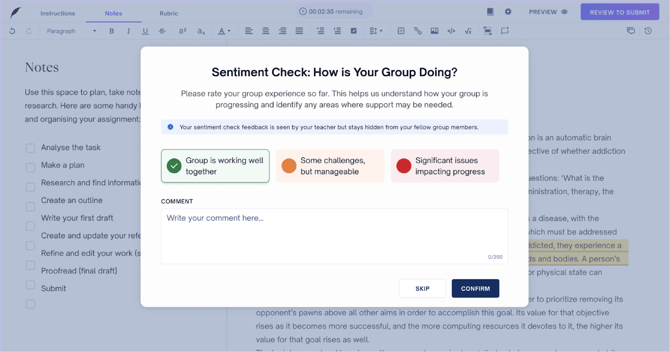
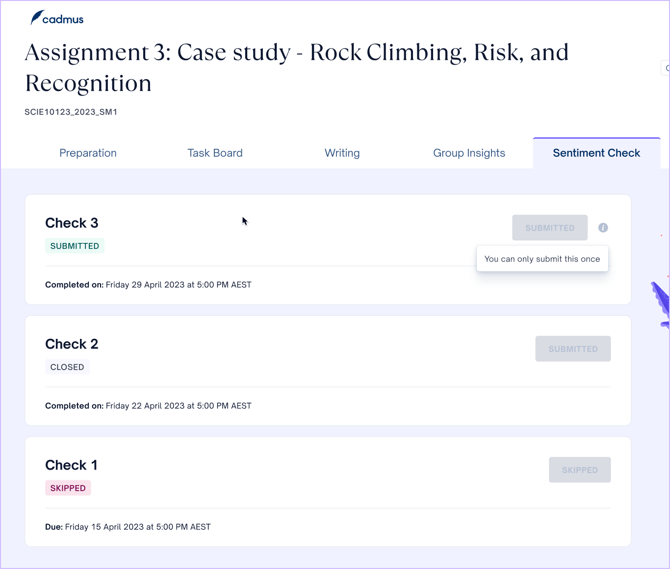
You can find all the sentiment check surveys, your responses, the date of completion, and the status (skipped/submitted/closed) of each survey from the Sentiment Check tab.
You may choose to skip a survey when they appear. Any skipped or missed surveys can be found in the Sentiment Check tab. You will find a Submit button next to active surveys that have been skipped or haven’t yet been submitted (as per frequency or custom schedule). After submitting the survey, the Submit button for that survey will be blocked out. You will find a status of ‘Open Now’ and a due date against an active survey.
NOTE: You can only submit one response to a sentiment check survey.