![Cadmus Wordmark & Logo_Master File_Cadmus Icon_Ink.png]](https://support.cadmus.io/hs-fs/hubfs/Cadmus%20Wordmark%20%26%20Logo_Master%20File_Cadmus%20Icon_Ink.png?height=40&name=Cadmus%20Wordmark%20%26%20Logo_Master%20File_Cadmus%20Icon_Ink.png)
With Cadmus, you can add links to your work using the Formatting Toolbar.
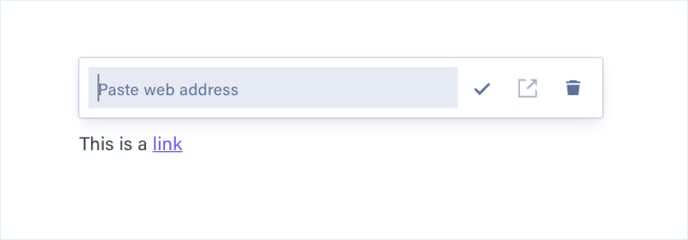
To add a link:
- Highlight the text you want to link.
- Click the
 link icon in the formatting toolbar.
 - Paste the URL into the field.
- Click the
 tick icon or press Enter to confirm.
Note: Currently, it’s not possible to add any additional text formatting (bold, italics, colours, etc.) to hyperlinks.
To edit a link:
- Click on the link you would like to edit.
- Edit the URL or paste in a new one.
- Click the tick icon or press Enter to confirm.
To remove a link:
- Click on the link you would like to remove.
- Click the
 delete icon.
To open a link:
- Click on the link you would like to remove.
- Click the
 open icon.