---
title: Group Formation - Self Enrolment
description: Learn how to self-enrol into groups in Cadmus Group Assessments
---
[Skip to content](https://support.cadmus.io/group-formation-self-enrolment#main-content)
English
Show submenu for translations
[Contact Support](https://support.cadmus.io/kb-tickets/new?hsLang=en)
[![Cadmus Wordmark & Logo\_Master File\_Cadmus Icon\_Ink.png\]](https://support.cadmus.io/hs-fs/hubfs/Cadmus%20Wordmark%20%26%20Logo_Master%20File_Cadmus%20Icon_Ink.png?height=40&name=Cadmus%20Wordmark%20%26%20Logo_Master%20File_Cadmus%20Icon_Ink.png)](https://support.cadmus.io/?hsLang=en)
- [Cadmus](https://cadmus.io/)
- [Contact Support](https://support.cadmus.io/kb-tickets/new)
Open main navigation
Close main navigation
- [Cadmus](https://cadmus.io/)
- [Contact Support](https://support.cadmus.io/kb-tickets/new)
- English
Show submenu for translations
- [Contact Support](https://support.cadmus.io/kb-tickets/new)
What would you like to learn?
- There are no suggestions because the search field is empty.
1. [Cadmus Help Docs](https://support.cadmus.io/?hsLang=en)
2. [Students](https://support.cadmus.io/students?hsLang=en)
3. [Group Assessments](https://support.cadmus.io/students?hsLang=en#group-assessments)
# Group Formation - Self Enrolment
## Learn how to self-enrol into groups in Cadmus Group Assessments
Your teacher will either assign you to groups or instruct you to self-enrol in groups.
If the self-enrolment option is selected, you will be expected to join a group within the group formation deadline.
To join a group:
1. Launch the group assessment by clicking on **Go to Cadmus** using the link in your LMS.
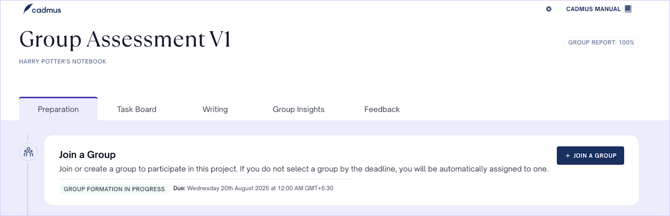
2. Under the *Preparation* tab, find the *Join a Group* section and click on **+ Join a Group**.
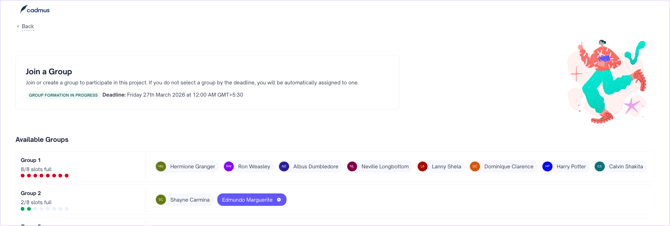
3. In the Self Enrolment section, you will see the group formation deadline at the top and the available groups below. Use the toggle pill at the top right to show all the available groups.
4. Find a group with available slots, and click on the **+ Join Group** button. You will see the number of slots free in a group. A full group will be indicated in red and a group with available slots will be indicated by green.
Once your group has all of its members, click **Finalise Group**. This confirms your group and unlocks access to the Group Charter. All group members must finalise the group before they can begin working on the charter.
5. You will see that the group you joined now shows one fewer available slot. Once your teacher has finalised the groups (or your group has been finalised), you can start working on the Group Charter and the tasks.
**NOTE**: If you fail to join a group within the self-enrolment deadline, you will be assigned a group at random.
**Important**: If the self-enrolment deadline passes before your group is finalised, the **Finalise Group** button will no longer be available. If this happens, your teacher will need to either extend the self-enrolment deadline or finalise the groups from their end before you can access the Group Charter.
**Requesting a Group Change**
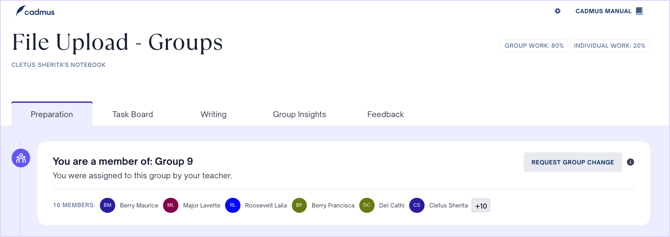
If you're unsatisfied with the group you've been assigned to by your teacher, you can request a group change from the *Preparation* tab. Once you click on the **Request Group Change** button, you will see a message that your teacher has been notified. Your teacher may or may not change your group after reviewing your request.
- [Teachers](https://support.cadmus.io/teachers?hsLang=en#main-content)
- [Introduction](https://support.cadmus.io/teachers?hsLang=en#introduction)
- [Setting up assessments](https://support.cadmus.io/teachers?hsLang=en#setting-up-assessments)
- [Managing your class](https://support.cadmus.io/teachers?hsLang=en#managing-your-class)
- [Turnitin + Cadmus](https://support.cadmus.io/teachers?hsLang=en#turnitin-cadmus)
- [Marking + feedback](https://support.cadmus.io/teachers?hsLang=en#marking-feedback)
- [Exams](https://support.cadmus.io/teachers?hsLang=en#exams)
- [Drafts](https://support.cadmus.io/teachers?hsLang=en#drafts)
- [Insights](https://support.cadmus.io/teachers?hsLang=en#insights)
- [Students working](https://support.cadmus.io/teachers?hsLang=en#students-working)
- [FAQs + Troubleshooting](https://support.cadmus.io/teachers?hsLang=en#faqs-troubleshooting)
- [Multi-format Assessments](https://support.cadmus.io/teachers?hsLang=en#multi-format-assessments)
- [Group Assessments](https://support.cadmus.io/teachers?hsLang=en#group-assessments)
- [Oral Assessments](https://support.cadmus.io/teachers?hsLang=en#oral-assessments)
- [Students](https://support.cadmus.io/students?hsLang=en#main-content)
- [Introduction](https://support.cadmus.io/students?hsLang=en#introduction)
- [Working in Cadmus](https://support.cadmus.io/students?hsLang=en#working-in-cadmus)
- [Submitting](https://support.cadmus.io/students?hsLang=en#submitting)
- [Grades + Feedback](https://support.cadmus.io/students?hsLang=en#grades-feedback)
- [Drafts](https://support.cadmus.io/students?hsLang=en#drafts)
- [FAQs + Troubleshooting](https://support.cadmus.io/students?hsLang=en#faqs-troubleshooting)
- [Multi-format Assessment](https://support.cadmus.io/students?hsLang=en#multi-format-assessment)
- [Group Assessments](https://support.cadmus.io/students?hsLang=en#group-assessments)
- [Oral Assessments](https://support.cadmus.io/students?hsLang=en#oral-assessments)
- [Admins](https://support.cadmus.io/admins?hsLang=en#main-content)
- [Integrations](https://support.cadmus.io/admins?hsLang=en#integrations)
- [Release Notes](https://support.cadmus.io/release-notes?hsLang=en)
- [Privacy Policy](https://support.cadmus.io/privacy-policy?hsLang=en)
- [Cadmus](https://cadmus.io/)
- [Video Tutorials](https://cadmus.io/video-tutorials/)
- [Contact Support](https://support.cadmus.io/kb-tickets/new)
- [System Status](https://cadmus.statuspage.io/)
[](http://cadmus.io)
Copyright © 2026, Cadmus