![Cadmus Wordmark & Logo_Master File_Cadmus Icon_Ink.png]](https://support.cadmus.io/hs-fs/hubfs/Cadmus%20Wordmark%20%26%20Logo_Master%20File_Cadmus%20Icon_Ink.png?height=40&name=Cadmus%20Wordmark%20%26%20Logo_Master%20File_Cadmus%20Icon_Ink.png)
To change a student's assessment dates, adjust their total assessment duration, grant extra attempts, or add extra preparation and response time, follow these steps:
- Navigate to the Progress tab. Find the student who needs special considerations in the class list.
- Click on the three dots to the right. Select between options: Give extra time, Give extra time or attempts (per question), and Change assessment window.
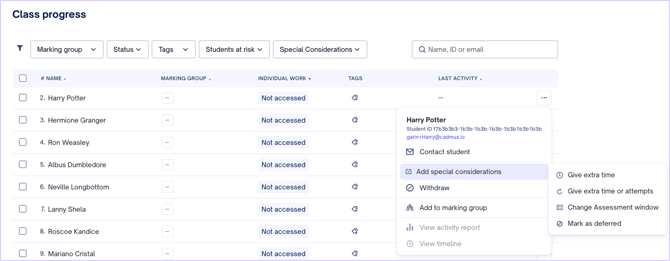
- This opens the special considerations panel, where the below can be adjusted:
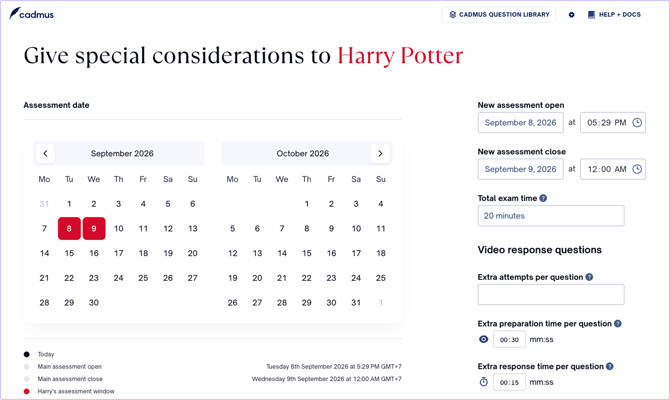
- Assessment open and close dates and times: Change when the student's assessment opens and closes.
- Total exam time: Adjust the overall time the student has to complete the assessment. This replaces the default total time rather than adding to it.
- For example: If a student has already used 7 minutes of a 17-minute assessment and needs 10 more minutes to finish their remaining attempts, set their Total exam time to 17 minutes (their elapsed time + the time they still need) — not 10 minutes, which would leave them only 10 minutes in total and cut their session short.
- Under Video Response Questions sections, the followings can also be adjusted:
- Extra attempts per question: Grant additional attempts on each question.
- Extra preparation time per question: Add time on top of the default preparation time for each question.
- Extra response time per question: Add time on top of the default response time for each question.
- Once the adjustments are made, click Confirm to save.
NOTE: It is important to allocate appropriate total exam time when granting extra attempts to a student. If a student is granted extra attempts, but has exhausted the assessment duration, the student will not be able to access oral assessment for re-takes.
NOTE: Extra preparation and response time are added on top of the default. For example, if a student is granted 15 seconds of extra preparation on a question with a 30-second default, they will have 45 seconds to prepare for that question.